
TNT registration is mandatory for all Talk ‘N Text users in the Philippines. Whether you are using a new TNT prepaid SIM, an old number, or a TNT 5G SIM, you must complete the registration process to keep your number active and avoid permanent deactivation.
The registration process is simple and usually takes only a few minutes if you prepare the correct documents beforehand. In this guide, you will learn how to register your TNT SIM online, the official registration link, requirements, accepted IDs, common errors, and practical solutions that actually work.
What Is TNT SIM Registration?
TNT SIM registration is the process of linking your mobile number to your personal identity under the Philippine SIM Registration Act (Republic Act No. 11934). The law requires all SIM users to register their numbers with their telecom provider.
The goal is to reduce scams, spam messages, fraud, and illegal activities involving anonymous SIM cards. Once registered, your TNT SIM can continue using calls, texts, mobile data, e-wallet verification, and online services normally.
Official TNT SIM Registration Link
You should always use the official Smart/TNT registration portal for security reasons.
Official Portal:
https://smart.com.ph/simreg
You can also register through the official TNT information page:
https://tntph.com/Pages/sim-reg
TNT SIM Registration Requirements
Before starting, prepare the following:
- TNT mobile number
- Valid government-issued ID
- Clear selfie photo
- Complete personal information
- Active internet connection
- SIM card inserted in your phone
Most users complete registration within 5–15 minutes.
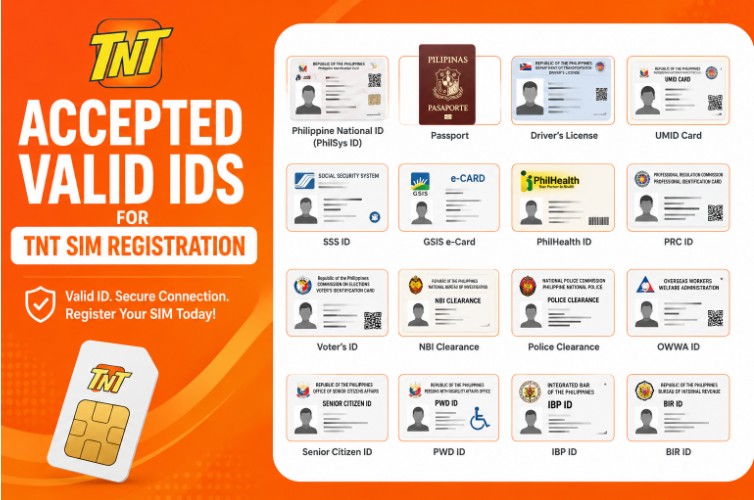
Accepted Valid IDs for TNT SIM Registration
TNT accepts many government-issued IDs in the Philippines, including:
- Philippine National ID (PhilSys ID)
- Passport
- Driver’s License
- UMID Card
- SSS ID
- GSIS e-Card
- PhilHealth ID
- PRC ID
- Voter’s ID
- NBI Clearance
- Police Clearance
- OWWA ID
- Senior Citizen ID
- PWD ID
- IBP ID
- BIR ID
Your ID must be clear, readable, and not expired.
How to Register TNT SIM Online
Step 1: Visit the Official Registration Portal
Open:
https://tntsimreg.com/
Step 2: Enter Your TNT Number
Type your TNT mobile number beginning with 9.
Example:
9123456789
Then click Send OTP.
Step 3: Verify OTP
Enter the one-time password sent to your TNT SIM via SMS.
Make sure your SIM has signal before requesting OTP.
Step 4: Fill Out Your Personal Information
Provide:
- Full name
- Date of birth
- Gender
- Nationality
- Complete address
- Email address (optional)
Important:
Your name must exactly match your valid ID.
Step 5: Upload Your Valid ID
Take a clear photo of your ID.
Tips for approval:
- Use natural lighting
- Avoid blurry images
- Make sure all corners are visible
- Remove glare and shadows
- Keep file size small
Many users report that smaller image sizes upload more successfully.
Step 6: Upload Your Selfie
Take a clear selfie matching your ID photo.
Avoid:
- Face masks
- Sunglasses
- Dark lighting
- Heavy filters
Step 7: Review and Submit
Check all details carefully before submission.
After successful registration, you will receive a confirmation SMS.
TNT SIM Registration via GigaLife App
You can also register through the Smart/GigaLife app.
Steps:
- Download the GigaLife App
- Open the app
- Enter your TNT number
- Verify OTP
- Complete the registration form
- Upload ID and selfie
- Submit registration
The app is available on Android and iPhone.
TNT SIM Registration for Foreign Nationals
Foreign nationals must provide additional documents depending on visa type.
Tourists Need:
- Passport
- Proof of Philippine address
- Return ticket showing departure date
Other Visa Holders Need:
- Passport
- ACR I-Card
- Proof of residence
- Supporting visa documents
Common TNT SIM Registration Problems and Fixes
Many users experience registration issues. Here are the most common problems and solutions.
1. Cannot Upload ID Photo
Fixes:
- Compress image below 5MB
- Use Chrome or Safari
- Switch to mobile browser
- Clear browser cache
- Retry later if server is busy
2. Camera Not Working
Solutions:
- Allow browser camera permission
- Use updated Chrome browser
- Restart your device
- Try another phone
3. OTP Not Received
Fixes:
- Ensure TNT signal is active
- Restart your phone
- Wait a few minutes
- Request OTP again
- Remove airplane mode
4. Registration Rejected
Possible reasons include:
- Blurry ID
- Name mismatch
- Wrong birthdate
- Incomplete details
- Invalid ID photo
Make sure all information exactly matches your identification document.
TNT SIM Registration Rewards
TNT and Smart occasionally offer free data promos after successful registration.
Common rewards may include:
- Free mobile data
- Free TikTok data
- Free calls
- Free texts
Promo availability changes regularly.
How to Check TNT SIM Registration Status
You can verify registration through:
- Smart SIM registration portal
- GigaLife app
- TNT customer support
If your number is already registered, the system will notify you.
TNT Customer Support
If registration continues failing, contact TNT/Smart support.
Hotline
- Dial *888 using TNT/Smart SIM
Official Website
https://tntph.com
Important Tips Before Registering
- Use stable internet
- Register only through official portals
- Double-check your ID details
- Avoid fake registration websites
- Keep your confirmation SMS
- Use readable, non-blurry images
Frequently Asked Questions
Is TNT SIM registration free?
Yes, TNT SIM registration is completely free.
Can I register using only one ID?
Yes, usually one valid government-issued ID is enough.
What happens if I do not register my TNT SIM?
Your SIM may be permanently deactivated under Philippine law.
Can I register multiple TNT SIM cards?
Yes, multiple SIMs can be registered under one person.
Can minors register TNT SIMs?
Yes, but the parent or guardian may need to register on behalf of the minor depending on requirements.
Final Thoughts
TNT SIM registration is now an essential step for every TNT user in the Philippines. The process is fast, free, and straightforward if you prepare your ID, selfie, and personal details properly.
Most registration problems happen because of blurry photos, large file sizes, browser permission issues, or mismatched information. Following the tips in this guide can help you complete registration smoothly and avoid rejection.
Always use the official Smart/TNT registration portal and keep your registration confirmation for future reference.

Samuel Reed is a devoted Christian writer with 4 years of experience sharing Bible verses, blessings, and prayers on Beginingrace.com. His writings reflect faith, hope, and the peaceful message of God’s grace for every heart